Thursday, February 23, 2017

sudo apt-get update Error 404 Not Found / remove ppa

$sudo apt-get update

Err http://ppa.launchpad.net wily/main amd64 Packages                                                                                                                                          
  404  Not Found


how to fix

sudo add-apt-repository --remove ppa:upubuntu-com/ppa


Ref:
failed-to-fetch-binary-i386-and-amd64-packages

Install wireshark on ubuntu

------------ On Debian/Ubuntu based Distros ------------ 
$ sudo apt-get install wireshark
------------ On CentOS/RHEL based Distros ------------
$ sudo yum install wireshark
------------ On Fedora 22+ Releases ------------
$ sudo dnf install wireshark

Ref:
wireshark-network-traffic-analyzer-for-linux

Stacer ubuntu system optimizer

--------------- On Ubuntu 64-bit --------------- 
$ wget https://github.com/oguzhaninan/Stacer/releases/download/v1.0.4/Stacer_1.0.4_amd64.deb
$ sudo dpkg --install Stacer_1.0.4_amd64.deb
$ Stacer
Ref:stacer-ubuntu-system-optimizer

Tuesday, February 21, 2017

Recovery file with foremost

$sudo apt install foremost

$sudo foremost -t jpg -i /home/user/Pictures -o /home/user/Downloads/scan

-t  file type
-i  search on Path
-o  keep on Path

Ref.
recover-deleted-file-in-linux

Tuesday, February 7, 2017

การใช้คำสั่ง cut และ grep ในการค้นหาข้อมูล

1. คำสั่ง cut
cut -d":" -f 1 /etc/passwd
root
daemon
bin
sys
sync
games

cut -d":" -f 1,7 /etc/passwd
root:/bin/bash
daemon:/bin/sh
bin:/bin/sh
sys:/bin/sh
sync:/bin/sync
games:/bin/sh

อ่านเพิ่มเติม
command cut

2. คำสั่ง grep
    2.1 grep -n   แสดงบรรทัดของสิ่งที่ค้นหา เช่น

#grep -n root passwd
1:root:x:0:0:root:/root:/bin/bash
12:operator:x:11:0:operator:/root:/sbin/nologin

    2.2 grep -v ไม่แสดงบรรทัดที่มีคำไม่ต้องการ เช่น ไม่แสดงคำว่า root
#grep -v root /etc/passwd

    2.3 grep -E ให้หาคำที่ขึ้นต้นด้วยอะไรสักอย่าง เช่น
#grep -E ^s /etc/passwd

^ใส่ก่อนตัวอักษรหรือตัวเลข ตัวแรก

อ่านเพิ่มเติม
using grep find pattern in file

** กรณีศึกษา **
ตัวอย่างการนับจำนวน user samba
1. ต้องรู้ว่า number ของ user group เช่น group: usershare = 1000 เช็คได้จาก /etc/group
2. ใช้คำสั่งต่อไปนี้

grep -n 1000 /etc/passwd > user01.txt
cut -d":" -f 2 user01.txt > user02.txt

แล้วจะได้รายชื่อ samba ที่อยู่ในกลุ่ม usershare


ปรับให้เฉพาะ user log FTP (Proftp)

Install Proftp

install-setup-proftpd-debian-9-stretch

* หลังจากเซท TLS ให้ แก้ไขไฟล์ /etc/proftpd/proftpd.conf เพื่อให้โหลดไฟล์ tls.conf ขึ้นมาทำงาน
Include /etc/proftpd/tls.conf

ติดตั้ง Firewalld เพิ่ม

apt install firewalld

เพิ่ม Rul firewall

firewall-cmd --zone=public --permanent --add-service=ftp
firewall-cmd --zone=public --permanent --add-port=6000-6100/tcp

* ปรับไฟล์ /etc/proftpd/proftpd.conf เพื่อเปิด PassivePorts  ให้ Login FTP ผ่าน FileZilla ได้

[...]DefaultRoot                     ~ !adm
PassivePorts    6000    6100
[...] 

Ref: proftpd

---------------------------------------------------------------------------------------------------------

ปรับเพิ่มเติมให้เฉพาะ user สามารถ log in FTP ได้ บาง user ไม่ให้เข้าใช้งาน FTP

ปรับแก้ไฟล์ /etc/passwd เช่น

www-data:x:33:33:www-data:/var/www:/usr/sbin/nologin

แก้ไขเป็น

www-data:x:33:33:www-data:/var/www:/usr/bin/false


-----------------------------------------------------------------------------------------------------------
Install quota on Debian 9
how-to-set-filesystem-quotas-on-debian-9

Set Quota:
Check quota on : quotaon -v /home
Add quota user: setquota -u logwin 10240M 10752M 0 0 /home
Edit quota user: edquota -u logwin
View quota user: quota -vs logwin
Report quota: repquota -s /home


ปรับให้การส่งเมลจาก root สแต้มด้วยชื่อที่ต้องการ เช่น Administrator

การปรับชื่อ Display ที่เกิดจากการส่งเมล Alert ของ user : root ให้สแต้มด้วยชื่อ Administrator แทน root

ตัวอย่าง 


ให้แก้ไขไฟล์ /etc/passwd เปลี่ยน roo:x:0:0:root:/root:/bin/bash เป็นชื่อที่ต้องการดังภาพด้านล่าง


Sunday, February 5, 2017

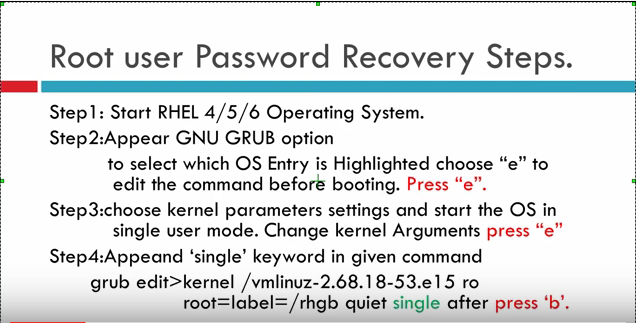
how to recovery password root on Redhat

1. when start press ' e '
2. choose OS press ' e ' again
3. Type single press enter
4. press 'b' to boot recovery


Ref: https://www.youtube.com/watch?v=GpP2r44cVjk